Character & Word Counter
Hindi या English कोई भी text paste करें — characters, words सब instantly count होंगे।
📐 Exam Reference Lengths
A Comprehensive Guide to Using the Character & Word Counter for Typing Exams
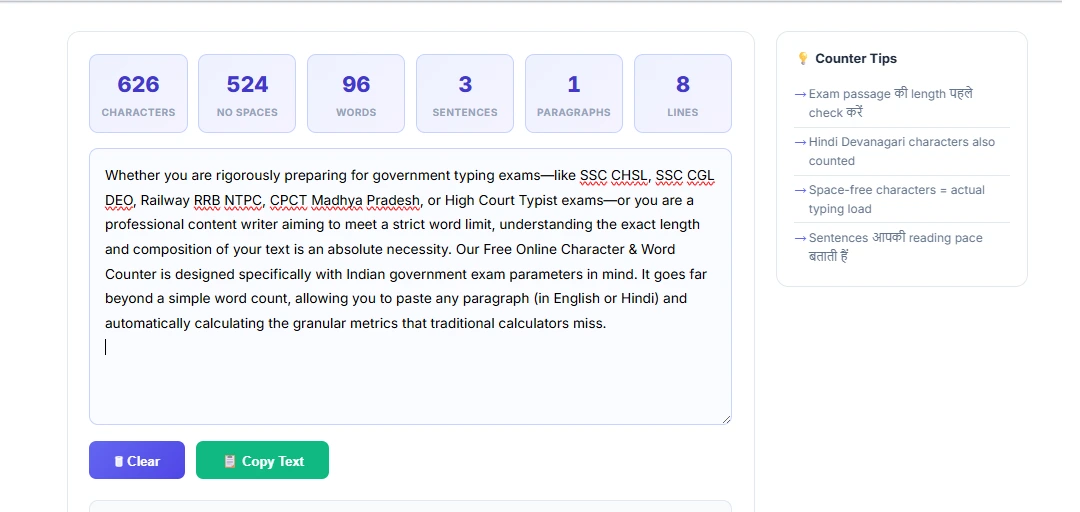
Whether you are rigorously preparing for government typing exams—like SSC CHSL, SSC CGL DEO, Railway RRB NTPC, CPCT Madhya Pradesh, or High Court Typist exams—or you are a professional content writer aiming to meet a strict word limit, understanding the exact length and composition of your text is an absolute necessity. Our Free Online Character & Word Counter is designed specifically with Indian government exam parameters in mind. It goes far beyond a simple word count, allowing you to paste any paragraph (in English or Hindi) and automatically calculating the granular metrics that traditional calculators miss.
Why is Character Counting Crucial for Government Typing Tests?
Many beginners assume that typing speed is simply about counting the number of complete words they type in a minute. However, official testing agencies like the Staff Selection Commission (SSC) and National Testing Agency (NTA) do not evaluate your speed based on actual dictionary words. Instead, they rely on a strict, globally recognized "Key Depression" formula. In this testing format, exactly 5 characters (or keystrokes) construct one standard "Word."
Because of this 5-character rule, knowing the exact character count of your daily practice paragraphs is the only way to genuinely calculate your Words Per Minute (WPM) or Key Depressions Per Hour (KPH). For instance, an SSC CHSL aspirant is legally required to achieve a speed of 35 WPM in English. In official terms, this implies the candidate must type approximately 10,500 Key Depressions Per Hour (KPH), which logically breaks down to exactly 1,750 keystrokes within their 10-minute test window. If the paragraph you practice at home only has 1,500 keystrokes, you are falsely inflating your assumed typing speed. This tool helps you calibrate your practice materials permanently.
Key Metrics Explained in Detail
Our interface breaks down your pasted text into six distinct metrics, each serving a unique diagnostic purpose:
- Total Characters: This is the absolute length of your text string. It includes every single alphabet, number, punctuation mark, and even the invisible spaces between your words. This metric represents the true physical effort your fingers exert during the exam.
- Characters (No Space): Essential for deeper linguistic analysis and calculating actual "Key Depressions" without the inflation of spacebar presses. Some specialized coding and data entry tests evaluate speed based entirely on non-whitespace characters.
- Total Words: Automatically splits your text wherever a space or line break occurs. While useful for essay writers and bloggers, remember that exam software rarely uses this literal definition for speed tracking.
- Sentences & Paragraphs: Extremely helpful for formatting checks. Sentences indicate your reading pace, while paragraph counts help mimic the exact visual structure provided in hardcopy typing test papers.
- Lines: Shows how vertically dense the text is, which aids in predicting how much scrolling might be required on a half-screen exam interface (a common hurdle in TCS-iON centers).
How to Effectively Use This Tool for Exam Prep
- Find Practice Material: Secure a newspaper editorial (like The Hindu or Dainik Jagran) or download a previous year typing passage from an SSC portal.
- Paste the Text Base: Copy the entire passage and paste it directly into our counter's large text box. The tool operates completely client-side in your browser, meaning it is instantaneous.
- Review Against Target Limits: Look at the "Total Characters" stat. If you are practicing for Railway RRB (300 words required over 10 mins), verify that the text block has at least 1,500 characters. If it falls short, append more text before starting your timer.
- Clean Formatting: Many copy-pasted texts contain hidden formatting or double spaces. The tool instantly reflects the raw keystrokes you'll realistically need to mimic on exam day.
Frequently Asked Questions (FAQs)
A: Yes, absolutely. Every time you press the spacebar to separate two words, it is officially counted as one key depression (or character) by the testing software. Punctuation marks like commas and periods also count.
A: Our tool is Unicode-compatible. It seamlessly calculates Devanagari characters (used in Hindi Mangal Remington Gail / Inscript) just as accurately as standard English text, recognizing Matras and half-letters uniquely based on their internal keystroke requirements.
A: The global standard is: Gross WPM = (Total Characters Typed / 5) / Test Duration in Minutes. You can pair this counter with our dedicated Net Speed Calculator for error-adjusted metrics.