Government Exam Typing Test
Practice for SSC, Railway, High Court, CPCT with real exam conditions
SSC Standard: English 35 WPM, Hindi 30 WPM (10 min)
Calculation: Net Speed = (Total Characters / 5) − Errors
Certificate of Achievement
Government Exam Typing Test
This is to certify that
Candidate Name
has successfully completed the typing test on MultiTyping.in
and demonstrated proficiency in government exam typing standards
Typing Speed
0 WPM
Accuracy
0%
Date
--/--/----
Free Online Typing Test for CPCT, SSC, Railway & High Court Exams
MultiTyping.in is India's most exam-accurate online typing test platform. Practice Hindi Krutidev, Mangal Inscript, Remington Gail, and English QWERTY typing with real exam conditions — backspace disabled, live WPM tracking, and the official government scoring formula.
Government Exam Typing Speed Requirements (2025–26)
Check the official typing speed requirement for your target exam before you start practising. This table covers all major government exams where typing is a qualifying or mandatory skill.
| Exam / Post | English | Hindi | Duration | Layout | Backspace |
|---|---|---|---|---|---|
| CPCT Typing Test MP Govt — All Departments |
30 WPM | 25 WPM | 15 min | Remington Gail | Disabled |
| SSC CGL / CHSL Typing Test DEO / LDC / Tax Assistant |
35 WPM | 30 WPM | 10 min | Mangal / Krutidev | Disabled |
| Allahabad High Court Typing Test RO / ARO / Steno / Typist |
30 WPM | 25 WPM | 10 min | Mangal Inscript | Disabled |
| Railway RRB Typing Test Junior Clerk / Typist |
30 WPM | 25 WPM | 10 min | Mangal Unicode | Disabled |
| UP Police / SI / ASI Typing Test | 25 WPM | 25 WPM | 10 min | Mangal / Krutidev | Disabled |
| Banking / IBPS / SBI Typing Clerk / PO Data Entry |
30 WPM | — | 10 min | QWERTY English | Disabled |
| State PSC / Secretariat Typist | 30 WPM | 25 WPM | 10 min | Exam Specific | Disabled |
* Speed requirements may vary by notification year. Always verify with the official exam notification.
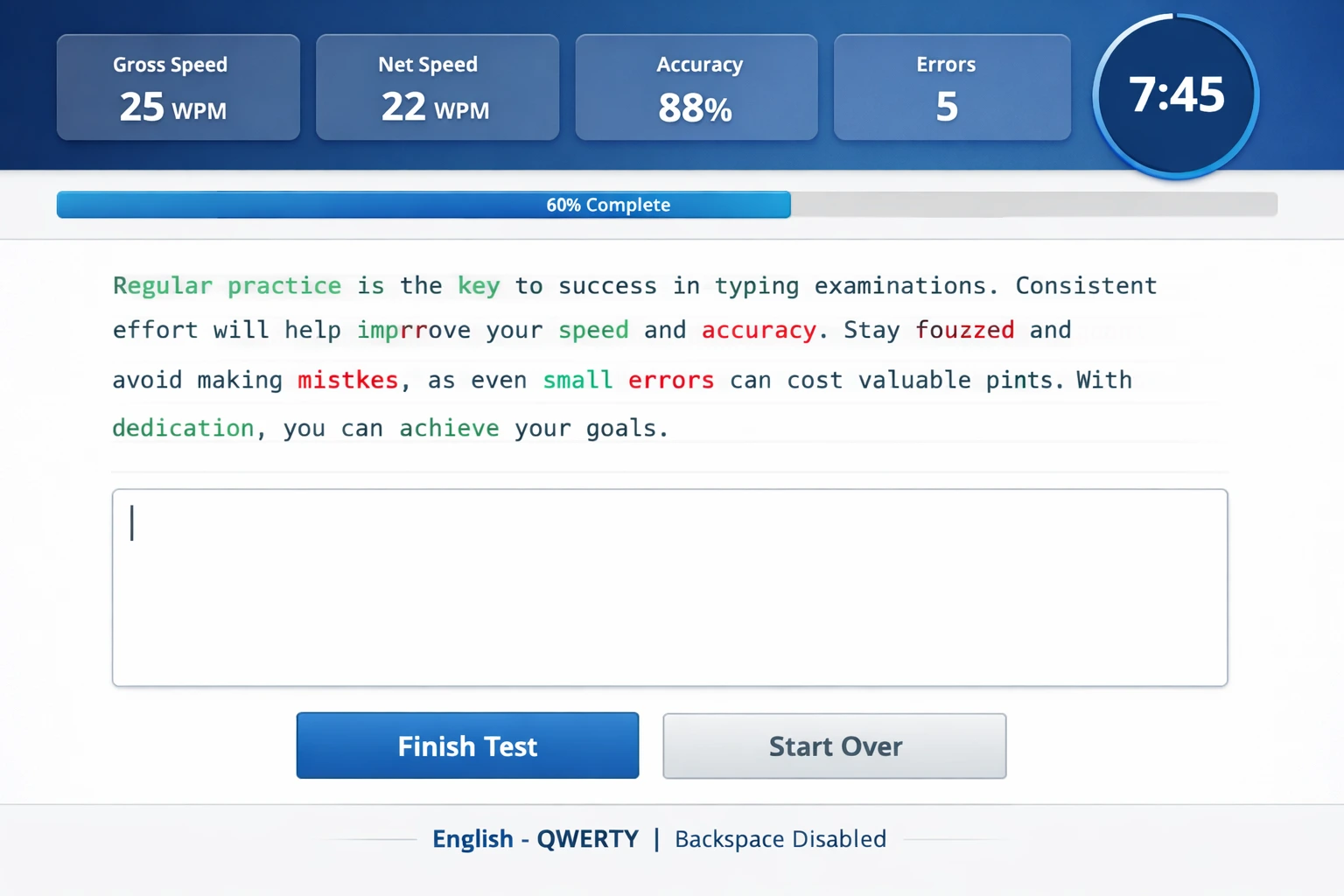
Live typing interface with real-time performance tracking
Why Choose MultiTyping.in for Your Typing Practice?
CPCT Typing Test — Exam Mode
Simulate the real CPCT typing test with Remington Gail layout, 15-minute timer, and backspace completely disabled.
Multi-Language & Layout Support
Krutidev, Mangal Inscript, Remington Gail, Unicode, English QWERTY plus 9 regional languages.
Live WPM & Accuracy Tracker
Monitor Gross WPM, Net WPM, accuracy %, and errors in real time using the official government scoring formula.
High Court & Legal Typing Test
Dedicated passages for Allahabad, Delhi, Rajasthan, and MP High Courts with legal vocabulary content.
Backspace Disable Feature
Enable "Disable Backspace" to practice exactly as in SSC CGL, CPCT, and Railway exams — no corrections allowed.
Leaderboard & Community
Compete with thousands of CPCT and SSC aspirants. Track your live rank and set weekly personal records.
Downloadable Practice Certificate
Generate a PDF certificate showing your WPM, accuracy, and date after every test session.
Responsive (Desktop Recommended)
Works on all screens, but desktop practice is strongly recommended — exams use physical keyboards.
100% Free — No Sign-Up Needed
All features — CPCT test, SSC practice, leaderboard, certificate — are completely free forever.
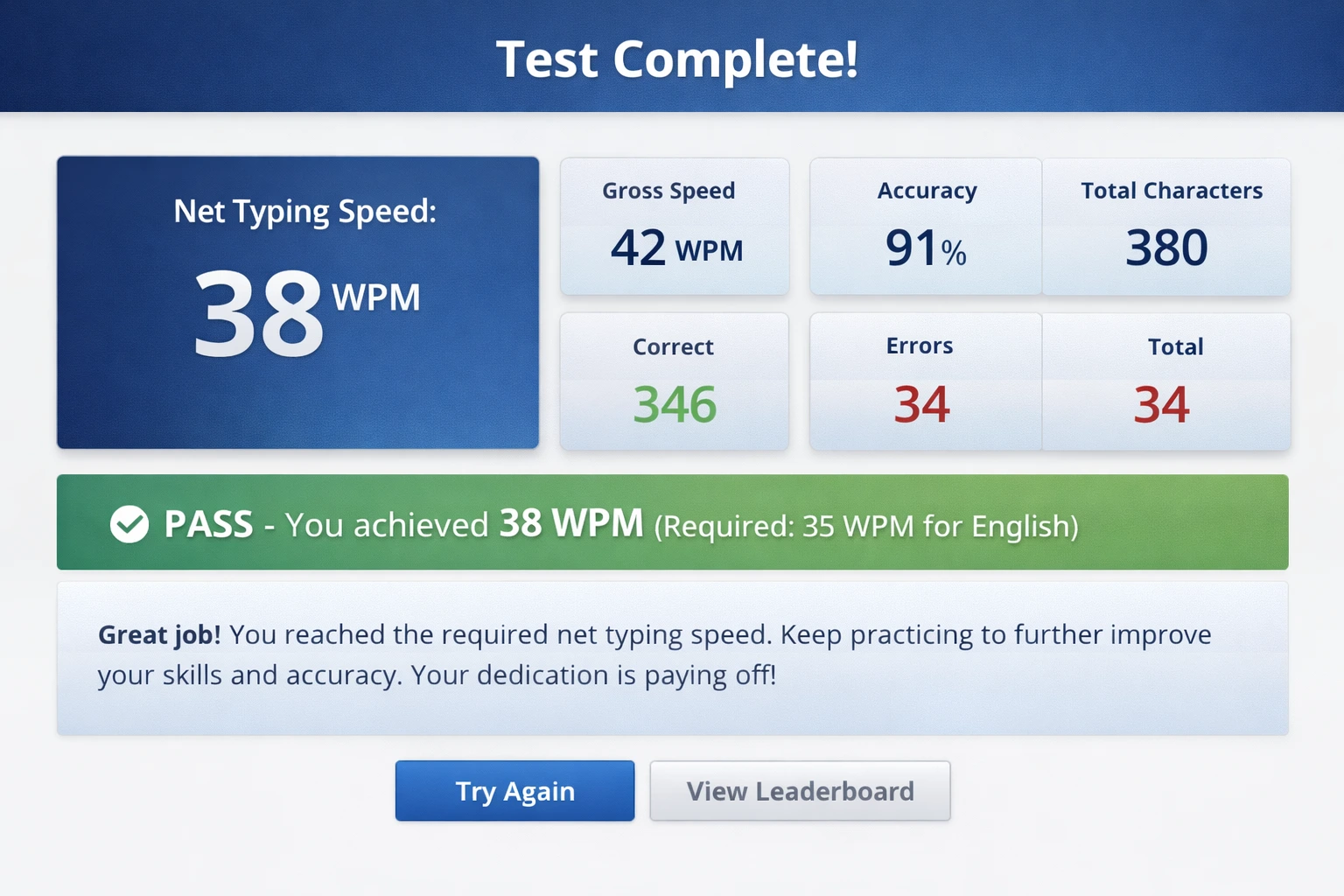
Comprehensive results with pass/fail status and improvement suggestions
How to Take the Online Typing Test — Step-by-Step
Select Your Language & Keyboard Layout
For CPCT select Remington Gail. For SSC CGL / High Court choose Krutidev 010 or Mangal Inscript. For English, select QWERTY. Matching the exact layout from your exam notification is critical for building correct muscle memory.
Set Test Duration to Match Your Exam
Select 10 minutes for SSC, Railway, and High Court tests. Select 15 minutes for CPCT. The countdown timer behaves exactly like the real computer-based test.
Choose the Right Difficulty Level
Start with Easy to build confidence. Use Medium for exam-level preparation. Switch to Hard once you consistently exceed the minimum required speed.
Enable "Disable Backspace" for Real Exam Mode
This is the single most important setting. Government typing exams never allow backspace. Always check this box — your net speed only improves when you train under the same restriction.
Enter Your Name for the Leaderboard
Optional but recommended. Your score will appear on the live leaderboard and your name will be printed on the practice certificate.
Start Typing — Focus on Accuracy First
Click the textarea and type the passage shown above. Do not rush. The top bar shows live Gross WPM, Net WPM, Accuracy %, and Error count updating every second.
Watch Your Net WPM — That is Your Qualifying Speed
Green characters = correct, Red = incorrect. The progress bar fills as you advance through the passage. Net WPM is what examiners check — keep it above the required cutoff.
Review Results & Download Certificate
After time ends you get Net Speed, Gross Speed, Accuracy, Characters, and a Pass/Fail verdict. Download your PDF certificate or click "Try Again" to continue practising.
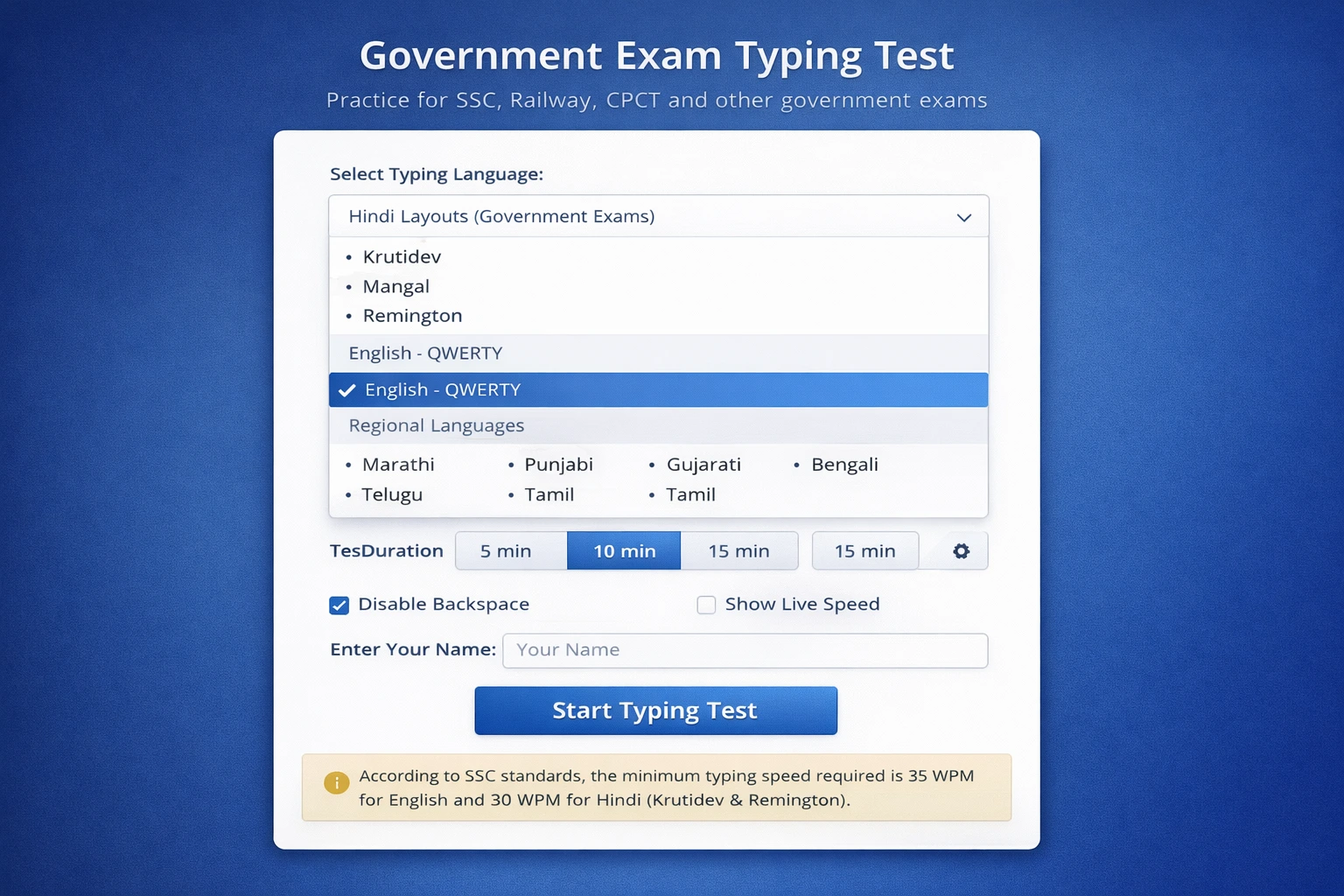
Easy setup with multiple language options and exam mode settings
💡 Typing Speed Kaise Badhaye — Expert Tips
Bahut saare students speed badhane ke chakkar mein accuracy kho dete hain. Shuruaat mein slow type karo lekin har character sahi ho. Jab 90%+ accuracy pakki ho jaye, tab speed apne aap badhne lagti hai. SSC aur CPCT dono mein net speed = gross speed minus errors — isliye ek galti kaafi costly hai.
Typing ek muscle memory skill hai. Roz thoda thoda practice karna ek hafte mein ek lambi session karne se kahin zyada effective hai. Subah ek 10-minute CPCT typing test do, dopahar ek SSC typing test do — bass 20-30 minute daily dedicated practice se 1 mahine mein 10-15 WPM ka improvement possible hai.
Agar aapka exam Krutidev 010 pe hoga, toh sirf Krutidev pe practice karo. Agar CPCT hai toh Remington Gail use karo. Layout switch karne se confusion hoti hai aur exam mein finger memory kaam nahi karti. Ek baar layout fix karo aur usi pe focus karo throughout preparation.
Real SSC, Railway, aur CPCT exam mein backspace use karne ki permission nahi hoti. Agar aap backspace ke saath practice karte ho, toh exam mein panic aayega. Hamesha "Disable Backspace" option ON rakho. Galti ho toh hone do — type karte raho. Yahi sab se important exam-like condition hai.
Seedhe baitho, screen se 50-60 cm ki doori rakho. Home row (ASDF JKL;) se typing seekho. Wrists flat honge, fingers slightly curved. Jo students proper touch typing technique use karte hain, unki speed naturally 40-50 WPM tak pahunchi 2-3 mahine mein.
Leaderboard pe top 10 users ki speed dekho. Unhe apna benchmark banao. Weekly ek specific target set karo — jaise "Is hafte mujhe 32 WPM net speed achieve karni hai." Chhote targets zyada effective hote hain bade ambiguous goals se.
Understanding Your Typing Test Results
After every test you get a detailed results card. Here is what each metric means and how it maps to your actual government exam evaluation.
📈 Net Typing Speed (WPM)
Your qualifying speed.
( Total Chars ÷ 5 − Errors ) ÷ Time (min)
SSC English min = 35 WPM. CPCT Hindi min = 25 WPM.
📉 Gross Speed (WPM)
Raw speed before error deduction.
( Total Chars ÷ 5 ) ÷ Time (min)
Target Gross at least 8–10 WPM above the required Net.
✅ Accuracy %
( Correct Chars ÷ Total Chars ) × 100
Most exams require minimum 90% accuracy alongside the speed requirement.
❌ Error Count
Each error directly reduces Net WPM. In a 10-minute test, 20 errors = −2 WPM. Near the cutoff, that means failing.
🔢 Total Characters
Total keystrokes (correct + incorrect). Higher is better — gives your net speed a higher ceiling.
✔️ Correct Characters
Characters that exactly matched the passage. Focus on maximising this — it drives both accuracy % and net speed.
Exam-Specific Typing Test Preparation Guide
🖥️ CPCT Typing Test — Complete Guide
The Computer Proficiency Certification Test (CPCT) is conducted by MAP_IT and is mandatory for all MP government jobs requiring computer operation. The typing test is 15 minutes long in both Hindi (Remington Gail) and English (QWERTY). Required speed: 30 WPM English, 25 WPM Hindi. Backspace, delete, and cut are all disabled.
📋 SSC CGL / CHSL Typing Test Rules
SSC typing test is a qualifying skill test for DEO, LDC, and Tax Assistant posts. English candidates must type at 35 WPM; Hindi at 30 WPM on Mangal or Krutidev. Duration: 10 minutes. Errors directly reduce your net qualifying score.
⚖️ High Court Typing Test — RO / ARO / Typist
The Allahabad High Court typing test is required for RO, ARO, and Computer Operator positions. Minimum speed: 25–30 WPM Hindi (Mangal Inscript), 30 WPM English. Passages contain legal terminology — familiarity with court vocabulary is a major advantage.
🚂 Railway RRB Typing Test — Junior Clerk / Typist
Railway typing tests for Junior Clerk, Typist, and Accounts Clerk require 30 WPM English or 25 WPM Hindi on Mangal Unicode. Duration: 10 minutes, no backspace. Net speed formula is identical to SSC — gross speed minus errors per minute.
❓ Frequently Asked Questions
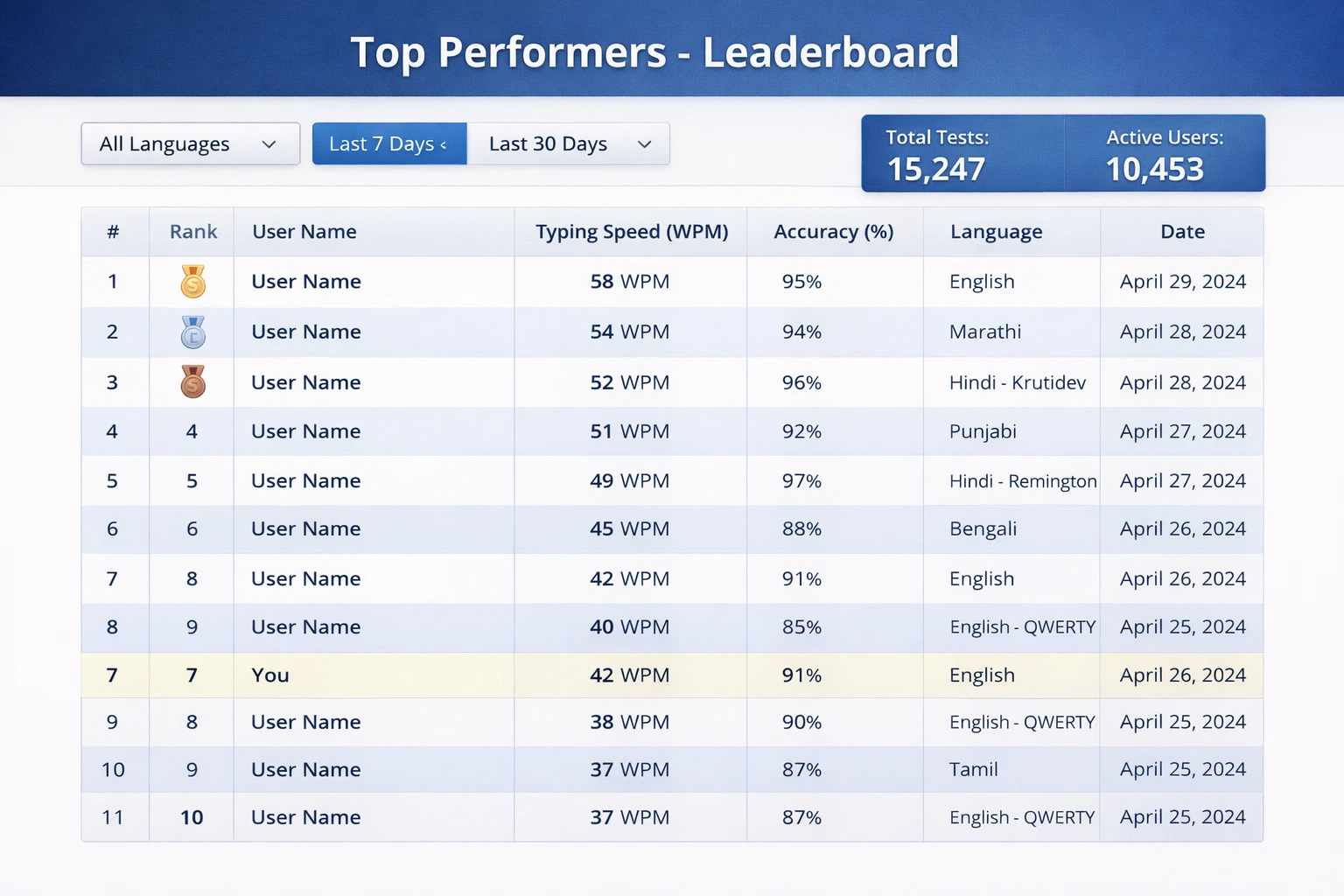
Track your progress and compete with other aspirants
🚀 Start Your Typing Test Right Now
Join thousands of CPCT, SSC CGL, and High Court aspirants practising daily on MultiTyping.in. Every minute of focused practice counts.
▶ Take Free Typing Test Now